The feature crew I was part of was tasked with incorporating the time of day feature into our existing professional service automation product. We conducted multiple customer research sessions and proof of concept tests, eventually settling on the idea of creating a calendar for our first iteration to achieve this objective.
Detail
Role: UX Designer
Type of Project: Feature Design
Duration: 4 months
Purpose: Work in Certinia
Disclaimer: This feature has already been launched by Certinia. All data and name included in the prototype are entirely fictional and intended solely for demonstration purposes. For more information and latest updates, please read Certinia official release notes.
Discovery
Customer Call
Before we began developing our solution, we conducted calls with our customers to understand their problems. We discovered that our customers' resources were using external calendars to organize tasks with dedicated times, such as meetings and customer calls. This caused a disjointed flow of information between our PSA product and their chosen external calendars, such as Google Calendar and Outlook Calendar. As a result, project managers were unable to consolidate resource time availability through a single source of truth, preventing them from effectively scheduling time-based work events for project resources.
Business Problem
As a project manager, I find it challenging to schedule events for the team in our PSA, as team members often schedule their events on external calendars.
Define
Lean UX Canvas
I organised the Lean UX canvas workshop with the feature crew to understand and consolidate user problems, business objective, possible solution and hypothesis to validate.
Snapshot of out Lean UX workshop
We discovered there are 3 major business problems we needed to address:
Awareness and visibility for event with specific date and time: Our PSA product lacked granularity in displaying tasks, which is crucial for project managers when assigning tasks.
Conflict: Without single source of truth on PSA, it caused time conflicts as project manager could not review resources' schedule on external calendar from PSA
Resources Utilisation: Some tasks are time specific, like meeting and workshop. Without knowing resources' time of day, it was difficult for project manager to schedule project task.
By resolving customers issues, we hoped to achieve two outcomes:
Bridge the market gap: Our product lacked integration with third-party tools. With our new solution, we could attract new markets.
Increase adoption: Addressing this issue could increase the average adoption of our product by creating a seamless experience between our platform and external tools.
And based on identified business problem, we came up few possible solutions:
External calendar syncing
Automation by using latest technologies company is investing
Task based resourcing
Single entry of event
Customer collaboration
Slack integration ...
Competitor Analysis
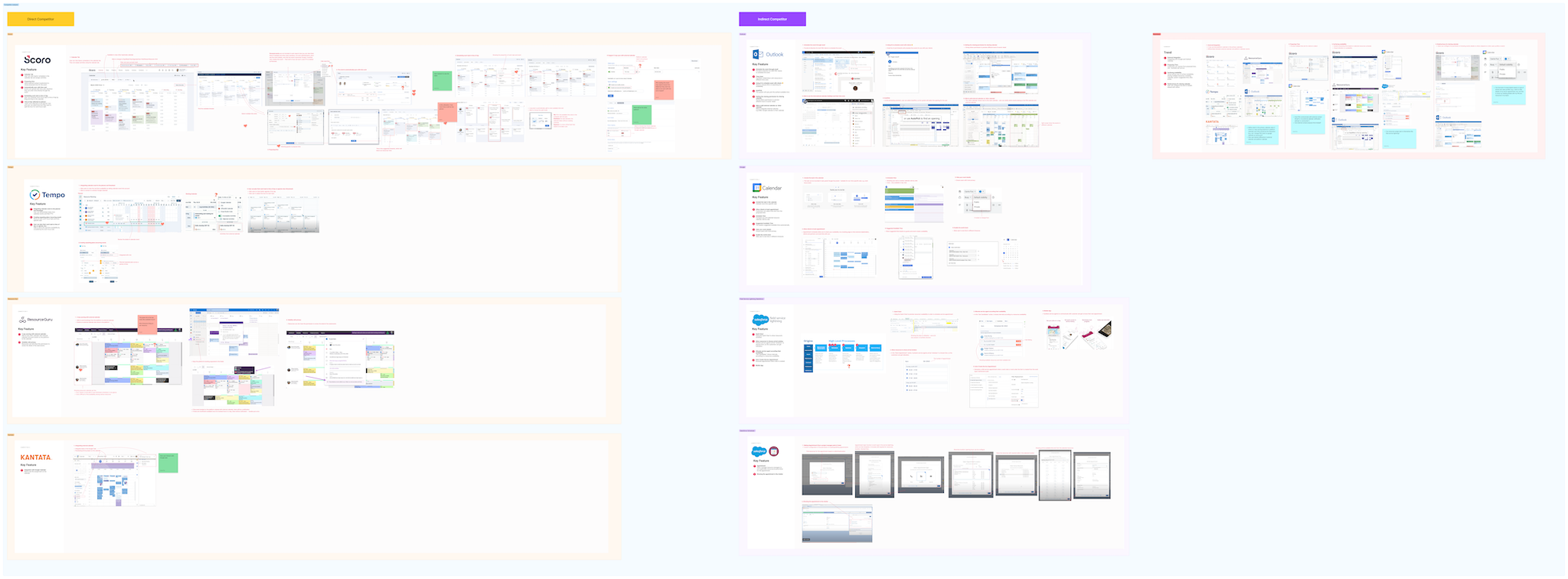
I also conducted competitor analysis to understand how other competitors achieve the time-of-day objective. I researched our direct competitors, such as Scoro, Tempo, Resource Guru, and Kantata, as well as indirect competitors like Outlook, Google, Field Service Lightning Salesforce, and Salesforce Scheduler.
We discovered that several competitors offer external integrations, such as Google and Outlook, allowing users to seamlessly sync their calendars. Additionally, they enable users' customers to propose times for events. Moreover, our competitors have the capability to display resources' availability, which is valuable for project managers when scheduling tasks. Lastly, these competitors provide users with the flexibility to configure their privacy sharing settings when creating events.
Ideation
User Journey Mapping
We chose to develop a calendar component as our initial step toward achieving the objective because it offered a relatively straightforward path and could serve as a cornerstone for future solutions. Once we settled on this approach, I facilitated a user journey mapping workshop with my feature crew to ensure alignment on the development vision for the calendar component. Throughout the workshop, our primary focus was on mapping out the process of creating events and synchronizing them with external calendars.
After we map the user journey, there are 5 major journey need to be addressed:
Check availability: Highlighting resources' availability is crucial for project managers to allocate time efficiently for scheduling project tasks, which can be facilitated through the implementation of filtering functionality.
Create Event: Unlike regular tasks created on the platform, we enable users to input location, time, and date, as well as add external resources' contacts to invite them via their preferred external calendar.
Sync with assignment: Assignments are essential objects that record resource allocations to the project on the platform. Syncing with their time cards based on the events reduces manual effort in entering time entries and maintains a single source of truth.
Communicate with clients: After events are created, events invites are sent to their customers, so customers can attend the events.
Sync with external calendar: It's important because we believe resources primarily use external calendars to review their daily schedules.
New flow
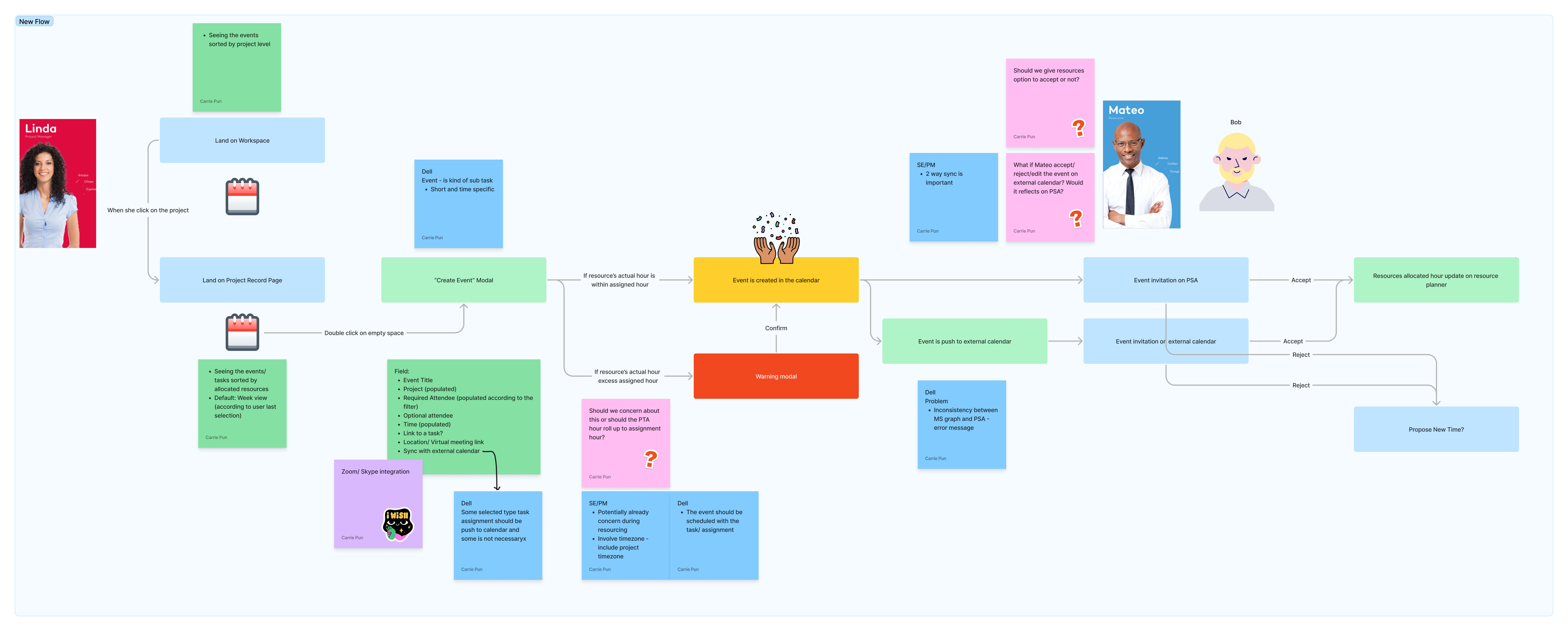
Based on the user journey map and the current object architecture of the software, we developed a new flow for the solution by introducing a new component and object.
A newly introduced object called "work event" is used to document tasks with specific times and locations involving more than one participant. To organize these records, a calendar component has been introduced to the platform, accessible from both the project management workspace and the project record page. These work events not only exist within the platform but are also synced to users' external calendars, allowing resources who may not always use our software to review their schedules. Additionally, we plan to sync work events with resource time cards on the assignments.
Evaluation
User Testing
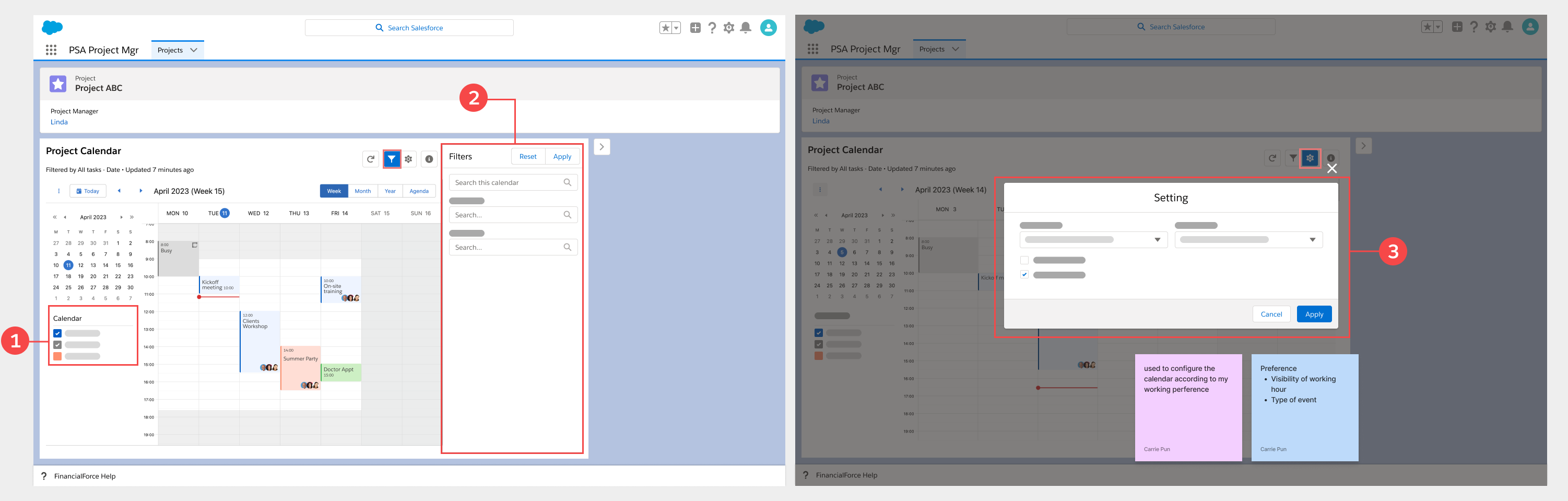
To comprehend users' interaction with the calendar component, I conducted a user testing session on usertesting.com, employing both qualitative and quantitative research methodologies. The objective of the test was to understand users' mental models regarding the association of different features across various panels, thereby enabling us to create a more user-friendly calendar.
I began by asking users background questions about how they typically schedule events for projects. Then, users were tasked with defining the differences between each panel. Subsequently, they were asked to determine which panel they preferred individual features, planned to be included in the calendar, to be placed. This approach allowed us to assess whether the features were positioned correctly based on users' mental models.
Result
The results are align with the design I have, except users expect the visibility of resources' working hours to be controlled in the right panel (Panel 2), and we should delve deeper into the feature of filtering different types of events.
Final Design
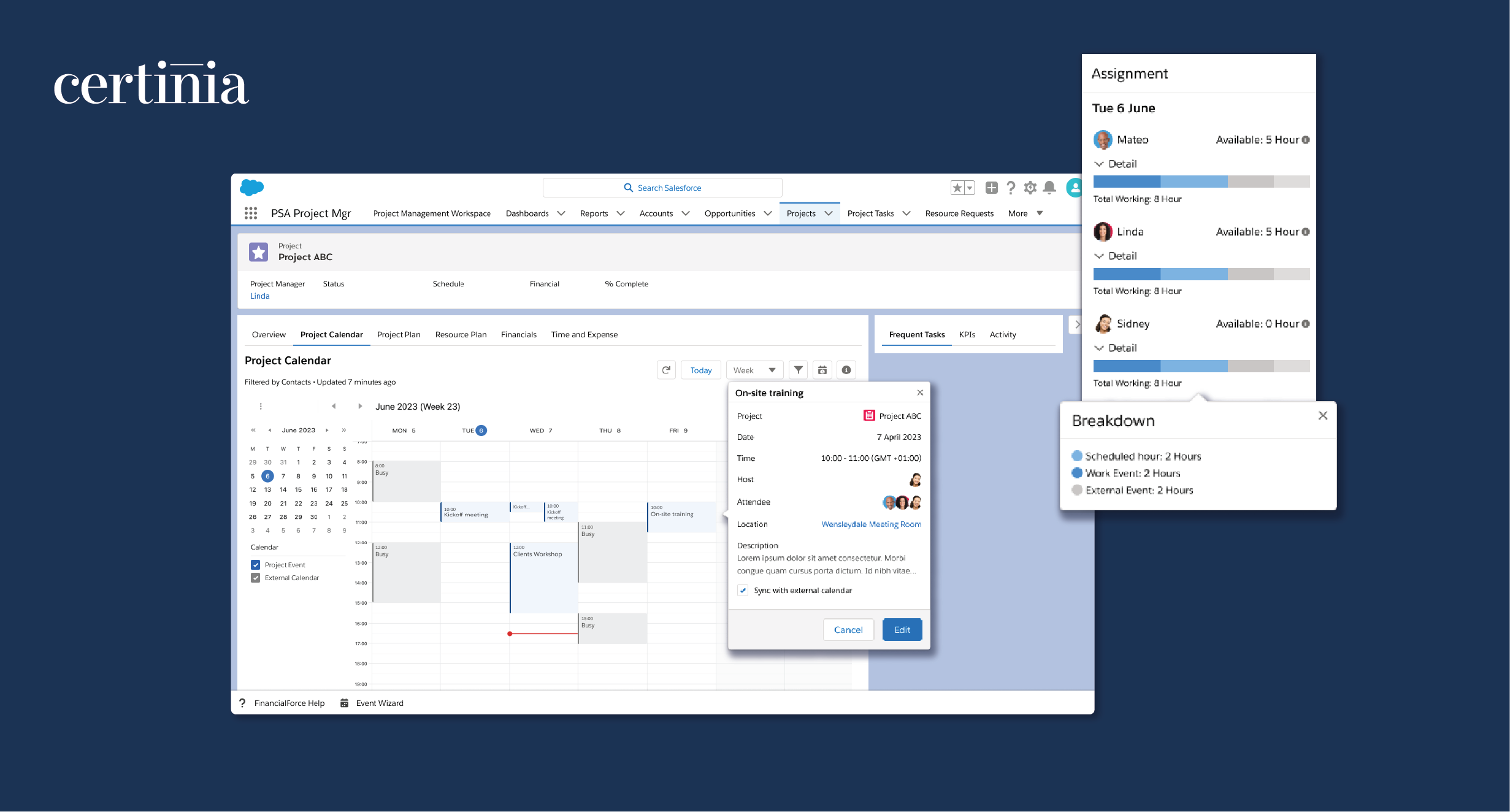
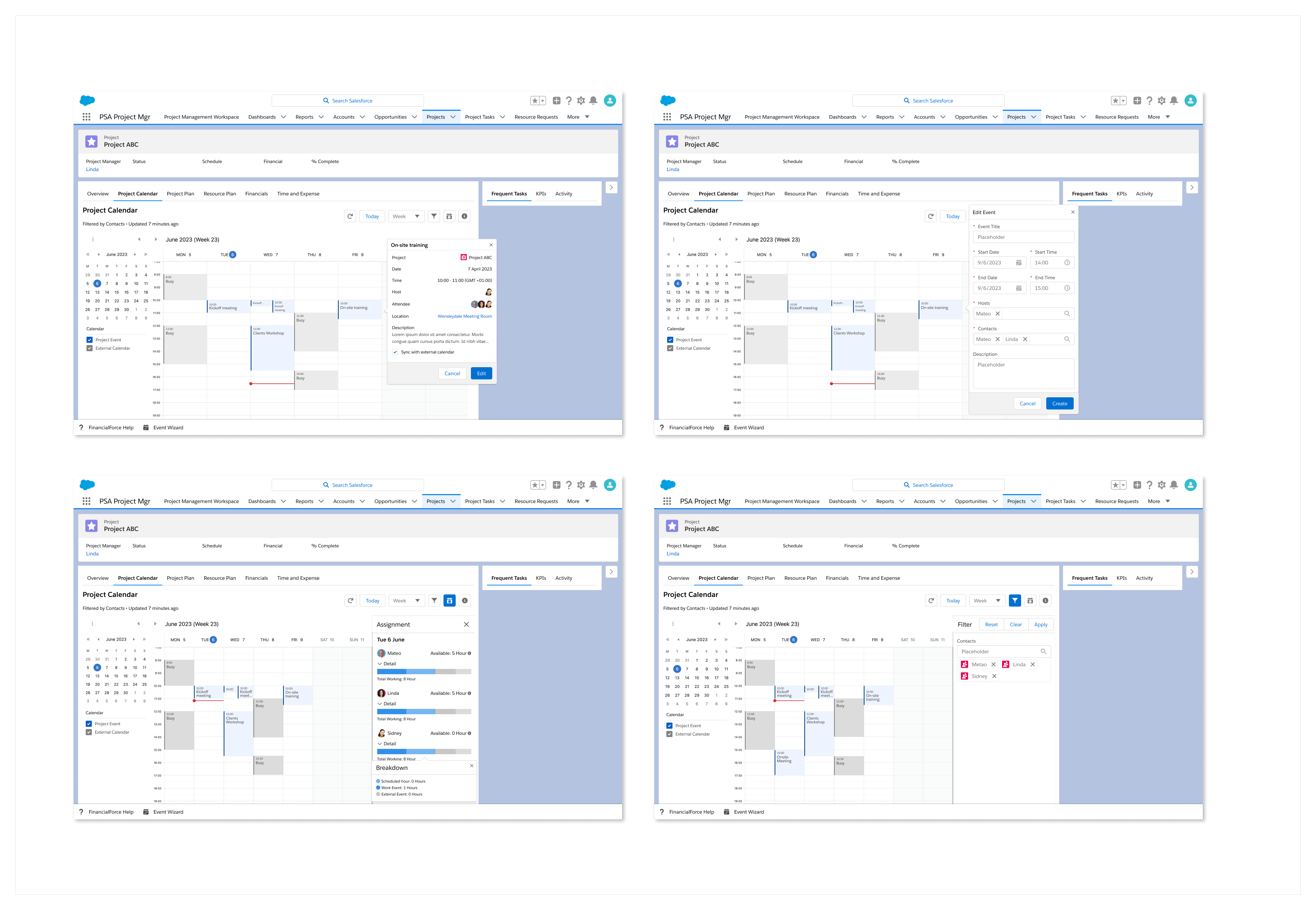
The calendar component will be placed on the project record page. These prototypes represent the first iteration of the calendar component in our PSA product. The prototypes in the upper row depict the UI of the event detail and edit popover. We've utilized the Bryntum calendar capacity and iterated the UI to align with Salesforce UI standards. Users can choose whether or not to sync the respective event to their preferred external calendar.
The prototypes in the lower row showcase the UI of the assignment panel and filter panel. The assignment panel displays the resource's scheduled hours, hours spent in work events, and hours captured in the external calendar, enabling project managers to track how many available hours are left in the resource's schedule. The filter panel allows users to filter events based on resources assigned to the project.
Reflection
In future iterations, we are contemplating the inclusion of a virtual meeting link in the meeting details, as well as a feature to assist project managers in scheduling time with customers directly on the calendar. Additionally, we are considering integrating with timecards to help resources reduce the manual effort of entering timecard information.
For more information, please check out the link below