CPQ, short for "Configure, Price, Quote," is a software solution designed to streamline and automate the quoting process for service-based products. Our Service CPQ aims to enhance estimator support during scoping, eliminating the reliance on external tools like Excel.
Solution:
Through extensive research and discovery, we have introduced a new object model that allows estimators to:
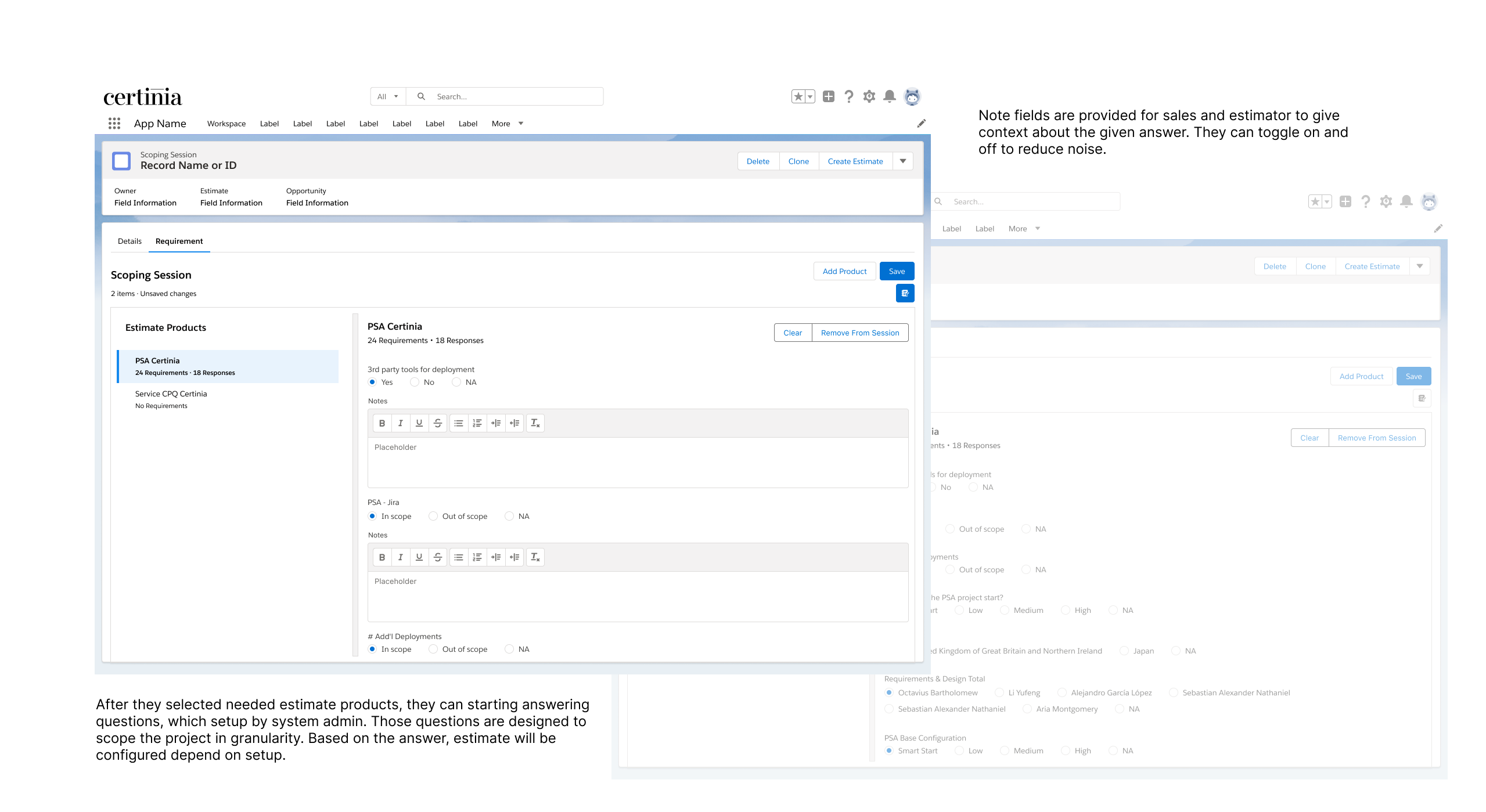
Save responses to scoping questions.
Configure questions for each standard offering.
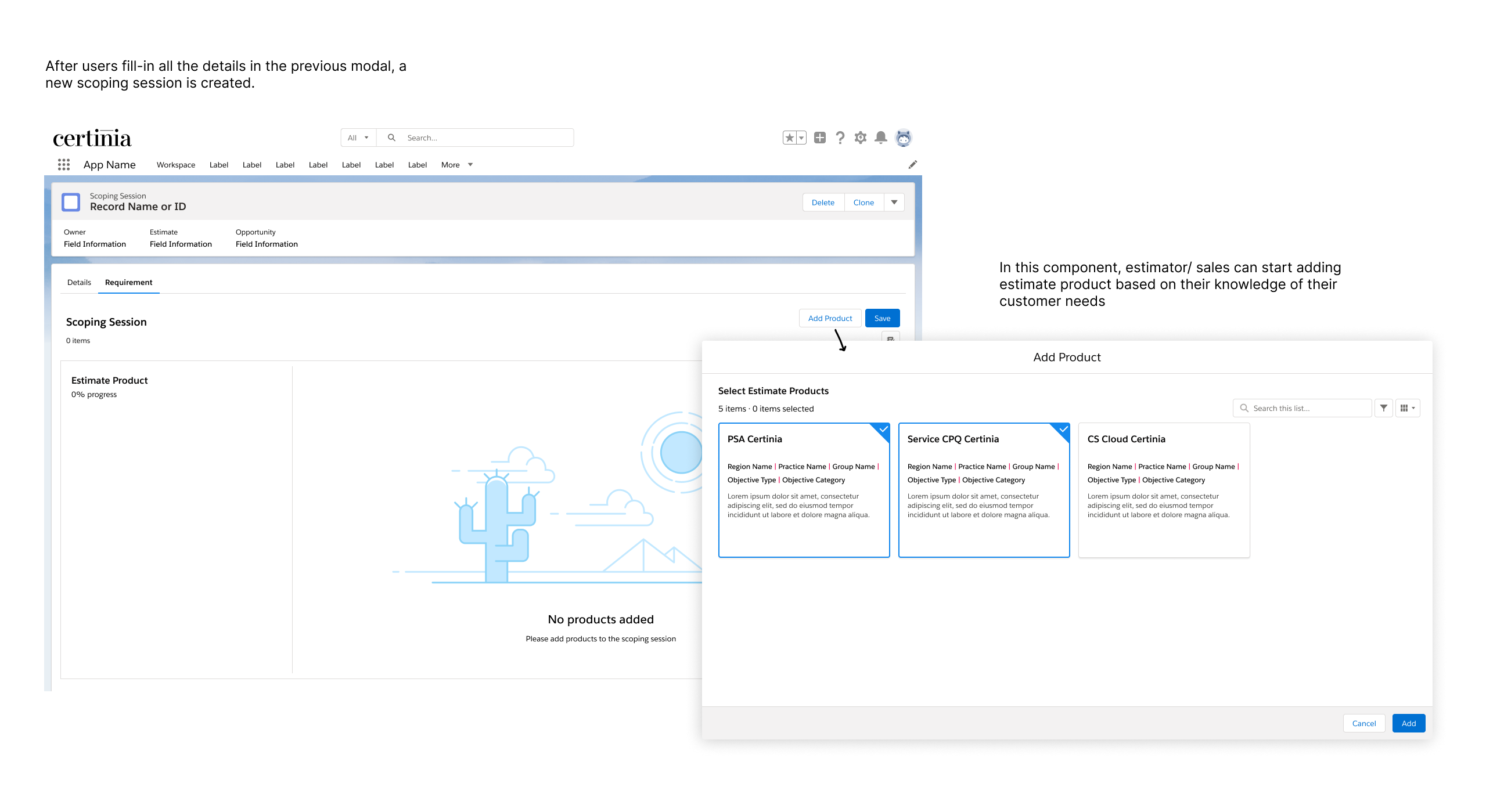
Utilize intuitive components to efficiently organize and answer scoping questions.
These improvements ensure a more structured, efficient, and user-friendly experience for estimators. For a deeper dive into our approach, check out our company blog on guided scoping.
Detail
Role: UX Designer
Type of Project: Feature Design
Duration: 8 months
Purpose: SCPQ Spring 24' release
Disclaimer: This feature has already been launched by Certinia. All data and name included in the prototype are entirely fictional and intended solely for demonstration purposes. For more information and latest updates, please read Certinia official release notes.
Discovery
Customer Call
I participated some customer calls while customers demo how they conducted scoping before creating estimate on our SCPQ tool, and there are 3 key similarities shared among all customers:
📐 Standardisation is the key drive for scoping. The benefit of scoping is standardisation and low divergence in estimate offering. Service companies don't want their estimators offer different price to same customers to eliminate risk of breaking trust.
🔎 Scoping is about discovering customers needs and requirements. Different customers utilise different tools and method in their scoping process, but ultimately they want to understand their customers need and requirement, so those insight can be reflected on the estimate.
🕰️ Want to start estimating earlier down the line. The reason is they can use the drafted price in their patch and get to discover whether the customer is a qualified opportunity.
Business Problem
Problem: Before creating estimation, discovery team need to document customers insight off platform, which increase manual effort for their admin process switch between platforms and risk of misalignment between insight and estimate.
Objective: Our goal is to allow estimators/sales to document scoping requirement on platform, in order to help them create standardised and accurate estimate with less manual effort.
Define
Before jumping into prototyping, I try to understand the requirement and current market landscape:
Job to be Done Statement
To understand what jobs users (estimator) would perform using guided scoping features, we identified some JTBD statements, and here are the 4 key ones:
🏃 When creating an estimate, sales/estimator want to be able to produce a accurate estimate quickly, so he/ she can minimise the effort of estimating and close the deal earlier
📊 When creating an estimate, sales/ want to minimalize variance between the estimate and real delivery, so he/ she can make sure the deal fulfil company’s KPI.
👯 When managing estimating process, service leader want to make sure all estimates create by every team members are consistent, so he/she can eliminate risk in individual deal
💼 When estimators are filtering opportunity, he/she want to understand the customers readiness via questions, so he/she can either win or loss quickly and push for more opportunities.
Competitor Analysis
I also analyze the scoping functionalities offered by other CPQ tools to better understand the competitive landscape. Direct competitors such as Zimit, Salesforce CPQ, SAP CPQ, and Provus provide guided selling and scoping features. Additionally, I consider Excel an indirect competitor, as many customers currently rely on it for scoping.
To quantify the findings, I compare these competitors against our defined JTBD (Jobs-To-Be-Done) statements, identifying which features they have successfully implemented and where market gaps exist.
Our analysis revealed a key gap in the market: Tools that assist estimators in scoping project size do not help customers choose the right product, while tools that guide product selection do not support project scoping.
As a result, we decided not to include guided selling in the initial phase of guided scoping. However, we identified it as a critical market opportunity for future iterations.
Solution and Hypothesis
After research and with time constraint, we decided to focused on the journey of estimator collecting customer's answer of standard requirement questions as we found out there were a lot of areas to cover to deliver the whole guided experience. We believe by providing guided scoping feature, we can help bringing customers to the platform for documenting scoping requirements, in result, it can help to improve adoption of estimate product
Ideation
User Story Mapping
After understanding the requirements, we have went through user story mapping exercise to understand users end to end journey of complete estimate process by using our guided scoping feature. And the journey can be simplified with 6 main steps:
Evaluation
Customer Validation
I and products manager presented the initial designs to customers who have expressed their interest in guided scoping functionality to get some feedback. We received positive feedback from them, but the only concern is the potential adoption of this feature, as it is not applicable for company that customise each service offering.
Besides, customers have expressed what they wished to be include in guided scoping:
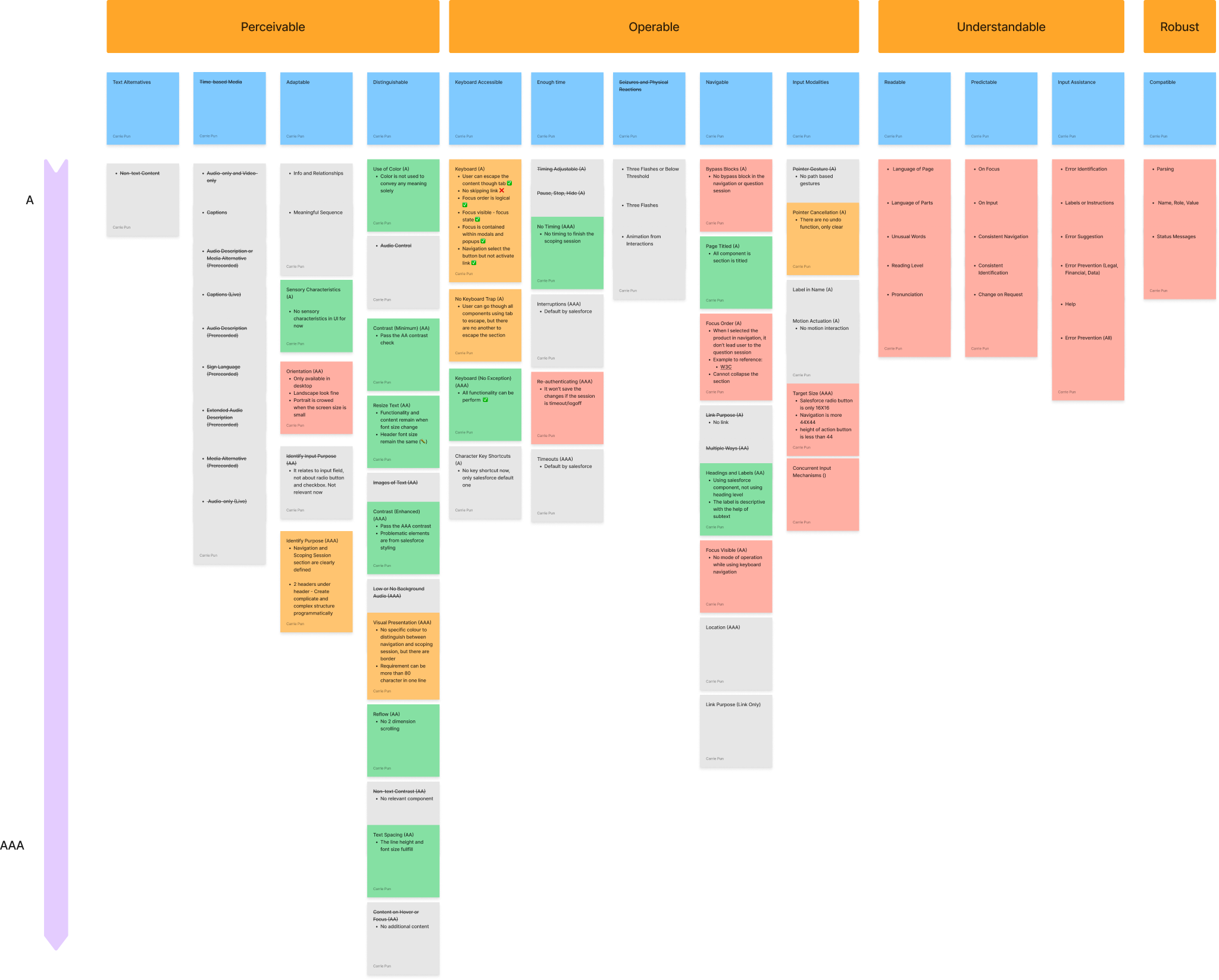
Accessibility Auditing
To ensure this feature is accessible for all users, I completed an accessibility audit for the component where the scoping task happen. I referenced WCAG 2.1 guideline, and evaluate the component from 4 perspective: 1. Perceivable, 2. Operable, 3. Understandable and 4. Robust.
The grey post it notes represent the criteria that are not applicable for this component or require technical evaluation. The green notes means achieved criteria, either by the design or salesforce native measure. The orange notes means achieved in certain degree and red note means unachieved criteria.
In all, there are few key future accessibility improvement:
Focus Order: Currently the order of focus go though all the items in the left navigation panel before focusing on the main content on the right, which reduce efficiency for keyboard navigation and inconsistent with other similar web layout. A improvement idea is after user selected the product on the navigation panel using keyboard, the focus will go to the main content on the right.
Responsive: Currently the component is not support other orientations and devices well enough.
Target Size: The target size of the radio button is not reach the minimum size of accessible target size. Switching to other input type, such as button or dropdown menu will improve the target size.
Usability Testing
After the feature is launched, I conducted an usability testing for both admin and scoping experience. Users praised the consolidated setup UI and easy navigation in scoping session. Challenges included understanding action types and high manual setup efforts.
Task Based test: Users are tasked to setup requirement set and complete scoping session. Using think aloud approach
Data: Qualitative data (Observation, feedback and interview)
Key Gaps:
Scoping Experience:
UI and Screen Real Estate: Limited screen space; Persistent presence of the notes field for each requirement was seen as adding "visual clutter".
Estimate Preview: Users want to understand exactly what each response is doing and its subsequent effect on the estimate; What If Scenarios.
Admin Experience:
Finding and Initiating Setup: Difficulty in locating the "Scoping Requirement Set" object; Lack of guidance
Action Setup: Action Type Confusion; Overwhelming Options in Picklist
Final Design
* Iterated design is still in production. The design above is design before testing
Reflection
As this is a complete new feature in all of the product, there are no existing pattern I can reference, therefore I need to design everything. Although it feels elaborate as I get the chance to work on something completely new, it is challenging in the same time as I need to explain really well to different internal and external stakeholders about what we are doing and trying to achieve and it is not an easy task as not everyone understand what SCPQ is used for.
We have overcame some turbulence, but luckily we successfully released the first version.
For more information, please check out the link below